
Industrial IoT alerts and notifications: how to design alerts people act on

Frequently asked questions
How many alerts should a system have?
Only the ones the team can handle and close. If most are ignored, the problem is the design, not the number of sensors.
What is the difference between monitoring and alerts?
Monitoring shows status and history. Alerts turn a deviation into a notified action with an owner. A system can monitor without alerting, but it should not alert without an owner.
Can we use SMS, email and calls?
Yes, depending on severity and criticality. What matters is that the channel fits the urgency and that escalation exists when there is no acknowledgment.
What happens if the connection drops?
The design should define local buffering, retry, synchronization and a communication alert. Data loss is also an event that must be detected.
Do alerts replace predictive maintenance?
No. Threshold-based alerts are condition-based maintenance. Prediction requires history, a variable related to the failure mode and a validated method.
In this article
A sensor that measures is not an alert. An alert is an operational decision: someone needs to know what happened, how urgent it is, what to do and by when. If the system does not answer those questions, the team learns to ignore it.
Designing industrial IoT alerts is designing a responsibility flow. The sensor is only the data source.
Event, alarm and alert are not the same
- Event: something happened and was recorded (a door opened, a temperature rose).
- Alarm: the event crossed a defined threshold and requires attention.
- Alert: the alarm was communicated to the right person, through the right channel, with context to act.
A dashboard full of events is not a replacement for an alert. The difference is the expected action.
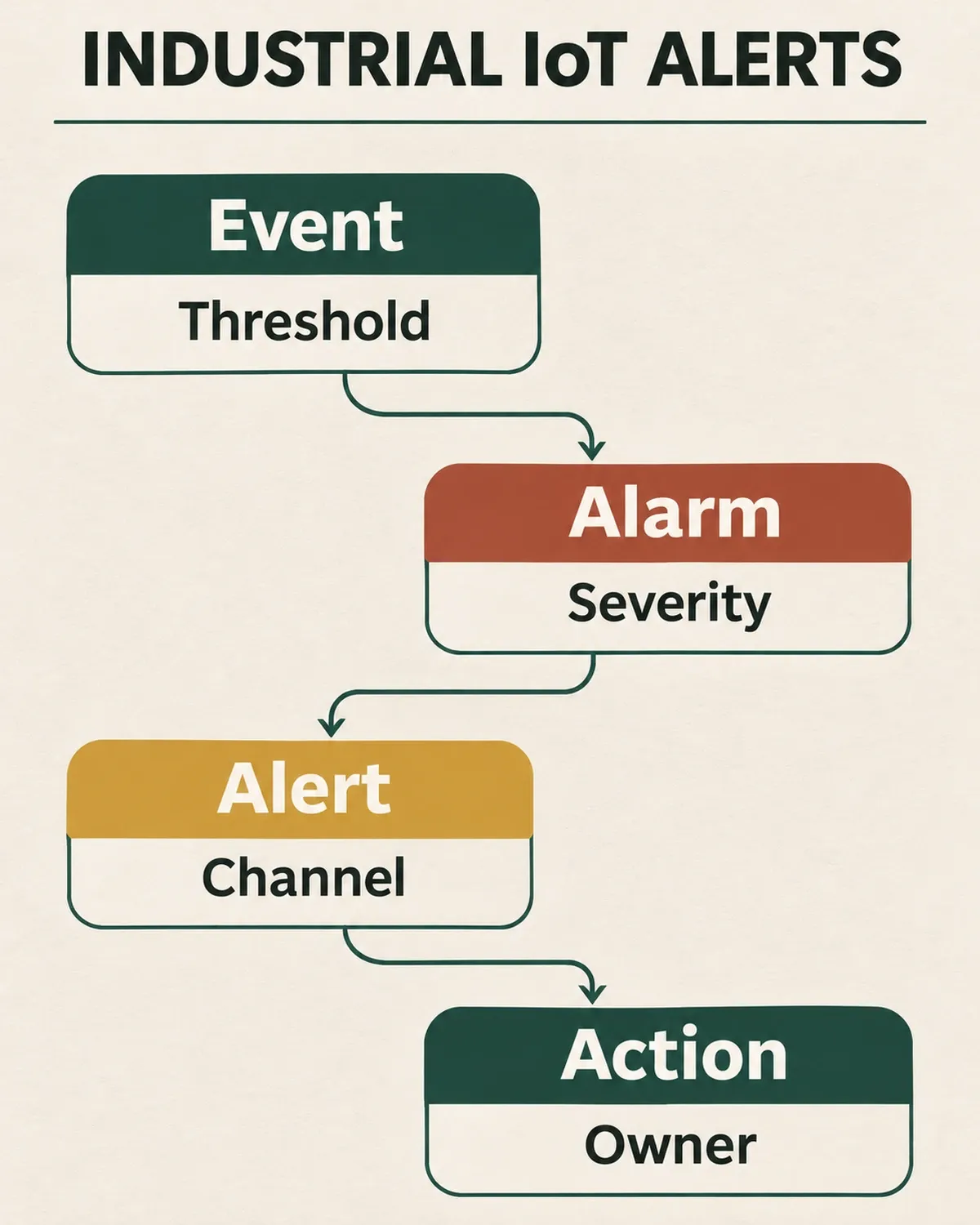
A useful alert connects the data with an owner and a concrete action.
What to define before configuring an alert
- Variable and condition. What is measured, in what range and for how long.
- Threshold. Value, hysteresis and confirmation time to avoid false positives.
- Severity. Informational, warning, critical or stop.
- Owner. Who receives, who escalates and who closes the alert.
- Channel. SMS, email, push, call, dashboard or maintenance integration.
- Response time. What is expected in 5 minutes, 1 hour and the next shift.
- Record. What is stored to analyze recurrence and improve the threshold.
Channels and escalation
Not every alert deserves a call. An informational alert can go to a dashboard; a critical one may require SMS, a call and escalation if not acknowledged within a defined time. The channel should match urgency and the team’s way of working.
Escalation prevents an alert from sitting on a phone nobody checks. It also prevents everything from escalating to everyone: when a critical alert always goes to five people, nobody feels responsible.
Alert fatigue and false positives
Fatigue appears when the system generates more alerts than the team can handle. The most common causes are poorly calibrated thresholds, missing hysteresis, noisy sensors and duplicate alerts.
To reduce them:
- separate critical from informational alerts;
- use confirmation time before notifying;
- group related alerts;
- review ignored alerts weekly;
- document which action closed each alert.
A system with a few useful alerts builds more trust than one with many “just in case” alerts.
Real-time monitoring: what it means
“Real time” does not mean the same to everyone. For a critical stop it may be seconds; for a temperature trend, minutes or hours. Defining acceptable latency avoids oversizing connectivity and cost.
Also define what happens when the internet or network drops: local buffer, retry, missing data and a communication alert. A system that does not warn when it stops receiving data can create false confidence.
Metrics to know if it works
- time between event and notification;
- percentage of alerts acknowledged;
- percentage of false positives;
- acknowledgment and closure time;
- repeated alerts for the same cause;
- incidents avoided or detected before a major failure.
How to design thresholds and hysteresis
Threshold design should start with a question: what decision does this alert enable? If the answer is “someone should look at it”, the alert is probably informational. If the answer is “someone must stop the line”, the threshold, channel and escalation need to be much stricter.
A well-chosen threshold separates noise from signal. If the sensor has normal variation, an alert that fires on every spike creates distrust. Hysteresis prevents the alert from repeatedly toggling near the limit; confirmation time requires the deviation to persist before notifying.
To calibrate:
- record normal behavior across several shifts;
- identify expected variation and repetitive spikes;
- define the value that actually indicates a problem;
- test the threshold against historical data;
- review it after the first weeks.
A threshold is not a permanent truth. It changes with product, maintenance and season. Documenting why it was chosen lets you adjust it without starting over.
Escalation, shifts and closure
A critical alert cannot depend on someone looking at a phone. Escalation defines what happens if there is no acknowledgment within a set time: the next owner is notified, a call is placed or the process stops according to risk.
Closure also needs a definition. An alert is not closed because the value returned to normal; it is closed when someone confirmed the cause and the action. Otherwise the problem returns and the history becomes useless.
In shift operations, handover should include open alerts, what was done and what remains. An alert nobody inherits is an alert that gets lost.
Alert matrix by severity
| Severity | Example | Channel | Expected response |
|---|---|---|---|
| Informational | Shift change, slight trend | Dashboard or email | Review during the shift |
| Warning | Temperature out of range | Email, push or SMS | Action within the hour |
| Critical | Stop, leak or safety risk | SMS and call | Immediate action and escalation |
| Emergency | Risk to people or facility | Call and protocol | Stop and defined response |
The matrix should be agreed with operations and maintenance, not imposed by the system. If the team cannot sustain the response, the severity is misdefined.
In summary
An alert is useful when it reaches the right person with enough context to act. Before adding sensors, define the decision, the owner and the response. Otherwise, the system only produces noise.